> ## Documentation Index
> Fetch the complete documentation index at: https://cometchat-22654f5b-message-composer-compact-message-composer.mintlify.site/llms.txt
> Use this file to discover all available pages before exploring further.
# Message Composer
## Overview
MessageComposer is a [Component](/ui-kit/ios/components-overview#components) that enables users to write and send a variety of messages, including text, image, video, and custom messages.
 MessageComposer is comprised of the following [Base Components](/ui-kit/ios/components-overview#base-components):
| Base Components | Description |
| ----------------------------------------- | ---------------------------------------------------------------------------------------------------------------------- |
| [MessageInput](/ui-kit/ios/message-input) | This provides a basic layout for the contents of this component, such as the TextField and buttons |
| [ActionSheet](/ui-kit/ios/action-sheet) | The ActionSheet component presents a list of options in either a list or grid mode, depending on the user's preference |
## Usage
### Integration
The following code snippet illustrates how you can directly incorporate the MessageComposer component into your file.
```csharp theme={null}
// syntax for set(user: User)
let messageComposer = CometChatMessageComposer()
messageComposer.set(user: user)
messageComposer.set(parentMessageId: 20)
```
### Actions
[Actions](/ui-kit/ios/components-overview#actions) dictate how a component functions. They are divided into two types: Predefined and User-defined. You can override either type, allowing you to tailor the behavior of the component to fit your specific needs.
##### 1. onSendButtonClick
The `set(onSendButtonClick:)` event gets activated when the send message button is clicked. The following code snippet Overrides the action of the send button in CometChatMessageComposer.
```swift theme={null}
messageComposer.set(onSendButtonClick: { message in
// return custom action here
})
```
***
##### 2. OnTextChanged:
The `set(onTextChanged:)` event gets activated when the user starts typing in message composer. This will return the text entered by the user.
```swift theme={null}
messageComposer.set(onTextChanged: { error in
// Handle action
})
```
***
##### 3. SetOnError
This method proves helpful when a user needs to customize the action taken upon encountering an error in CometChatMessageComposer.
```swift theme={null}
messageComposer.set(onError { error in
// Override on error
})
```
***
### Filters
MessageComposer component does not have any available filters.
***
### Events
[Events](/ui-kit/ios/components-overview#events) are emitted by a `Component`. By using event you can extend existing functionality. Being global events, they can be applied in Multiple Locations and are capable of being Added or Removed.
The MessageComposer Component does not emit any events of its own.
***
## Customization
To fit your app's design requirements, you can customize the appearance of the MessageComposer component. We provide exposed methods that allow you to modify the experience and behavior according to your specific needs.
### Style
Using Style you can customize the look and feel of the component in your app, These parameters typically control elements such as the color, size, shape, and fonts used within the component.
##### 1. MessageComposer Style
To customize the styling, you can apply the `MessageComposerStyle` to the `MessageComposer` component.
**Global level styling**
```swift theme={null}
CometChatMessageComposer.style.activeSendButtonImageBackgroundColor = UIColor(hex: "#F76808")
CometChatMessageComposer.style.attachmentImageTint = UIColor(hex: "#F76808")
CometChatMessageComposer.style.voiceRecordingImageTint = UIColor(hex: "#F76808")
CometChatMessageComposer.style.stickerTint = UIColor(hex: "#F76808")
CometChatMessageComposer.style.aiImageTint = UIColor(hex: "#F76808")
```
**Instance level styling**
```swift theme={null}
let customComposerStyle = MessageComposerStyle()
customComposerStyle.activeSendButtonImageBackgroundColor = UIColor(hex: "#F76808")
customComposerStyle.attachmentImageTint = UIColor(hex: "#F76808")
customComposerStyle.voiceRecordingImageTint = UIColor(hex: "#F76808")
customComposerStyle.stickerTint = UIColor(hex: "#F76808")
customComposerStyle.aiImageTint = UIColor(hex: "#F76808")
let messageComposer = CometChatMessageComposer()
messageComposer.style = customComposerStyle
```
MessageComposer is comprised of the following [Base Components](/ui-kit/ios/components-overview#base-components):
| Base Components | Description |
| ----------------------------------------- | ---------------------------------------------------------------------------------------------------------------------- |
| [MessageInput](/ui-kit/ios/message-input) | This provides a basic layout for the contents of this component, such as the TextField and buttons |
| [ActionSheet](/ui-kit/ios/action-sheet) | The ActionSheet component presents a list of options in either a list or grid mode, depending on the user's preference |
## Usage
### Integration
The following code snippet illustrates how you can directly incorporate the MessageComposer component into your file.
```csharp theme={null}
// syntax for set(user: User)
let messageComposer = CometChatMessageComposer()
messageComposer.set(user: user)
messageComposer.set(parentMessageId: 20)
```
### Actions
[Actions](/ui-kit/ios/components-overview#actions) dictate how a component functions. They are divided into two types: Predefined and User-defined. You can override either type, allowing you to tailor the behavior of the component to fit your specific needs.
##### 1. onSendButtonClick
The `set(onSendButtonClick:)` event gets activated when the send message button is clicked. The following code snippet Overrides the action of the send button in CometChatMessageComposer.
```swift theme={null}
messageComposer.set(onSendButtonClick: { message in
// return custom action here
})
```
***
##### 2. OnTextChanged:
The `set(onTextChanged:)` event gets activated when the user starts typing in message composer. This will return the text entered by the user.
```swift theme={null}
messageComposer.set(onTextChanged: { error in
// Handle action
})
```
***
##### 3. SetOnError
This method proves helpful when a user needs to customize the action taken upon encountering an error in CometChatMessageComposer.
```swift theme={null}
messageComposer.set(onError { error in
// Override on error
})
```
***
### Filters
MessageComposer component does not have any available filters.
***
### Events
[Events](/ui-kit/ios/components-overview#events) are emitted by a `Component`. By using event you can extend existing functionality. Being global events, they can be applied in Multiple Locations and are capable of being Added or Removed.
The MessageComposer Component does not emit any events of its own.
***
## Customization
To fit your app's design requirements, you can customize the appearance of the MessageComposer component. We provide exposed methods that allow you to modify the experience and behavior according to your specific needs.
### Style
Using Style you can customize the look and feel of the component in your app, These parameters typically control elements such as the color, size, shape, and fonts used within the component.
##### 1. MessageComposer Style
To customize the styling, you can apply the `MessageComposerStyle` to the `MessageComposer` component.
**Global level styling**
```swift theme={null}
CometChatMessageComposer.style.activeSendButtonImageBackgroundColor = UIColor(hex: "#F76808")
CometChatMessageComposer.style.attachmentImageTint = UIColor(hex: "#F76808")
CometChatMessageComposer.style.voiceRecordingImageTint = UIColor(hex: "#F76808")
CometChatMessageComposer.style.stickerTint = UIColor(hex: "#F76808")
CometChatMessageComposer.style.aiImageTint = UIColor(hex: "#F76808")
```
**Instance level styling**
```swift theme={null}
let customComposerStyle = MessageComposerStyle()
customComposerStyle.activeSendButtonImageBackgroundColor = UIColor(hex: "#F76808")
customComposerStyle.attachmentImageTint = UIColor(hex: "#F76808")
customComposerStyle.voiceRecordingImageTint = UIColor(hex: "#F76808")
customComposerStyle.stickerTint = UIColor(hex: "#F76808")
customComposerStyle.aiImageTint = UIColor(hex: "#F76808")
let messageComposer = CometChatMessageComposer()
messageComposer.style = customComposerStyle
```
 The following properties are exposed by MessageComposerStyle:
| **Property** | **Description** | **Code** |
| ----------------------------------------- | -------------------------------------------------------------- | ------------------------------------------------------------------------------------------------------------------------ |
| **Placeholder Text Font** | Font for the placeholder text in the input field. | `CometChatMessageComposer.style.placeHolderTextFont = CometChatTypography.Body.regular` |
| **Placeholder Text Color** | Color for the placeholder text in the input field. | `CometChatMessageComposer.style.placeHolderTextColor = CometChatTheme.textColorTertiary` |
| **Text Field Color** | Text color for the input field. | `CometChatMessageComposer.style.textFiledColor = CometChatTheme.textColorPrimary` |
| **Text Field Font** | Font for the input field text. | `CometChatMessageComposer.style.textFiledFont = CometChatTypography.Body.regular` |
| **Background Color** | Background color with dynamic support for light and dark mode. | `CometChatMessageComposer.style.backgroundColor = UIColor.dynamicColor(lightModeColor: ..., darkModeColor: ...)` |
| **Corner Radius** | Corner radius for the composer. | `CometChatMessageComposer.style.cornerRadius = CometChatCornerStyle?` |
| **Border Width** | Border width for the composer. | `CometChatMessageComposer.style.borderWidth = 0` |
| **Border Color** | Border color for the composer. | `CometChatMessageComposer.style.borderColor = .clear` |
| **Send Button Image** | Icon for the send button. | `CometChatMessageComposer.style.sendButtonImage = UIImage(named: "custom-send")` |
| **Send Button Tint Color** | Tint color for the send button image. | `CometChatMessageComposer.style.sendButtonImageTint = CometChatTheme.white` |
| **Active Send Button Background Color** | Background color for the send button when active. | `CometChatMessageComposer.style.activeSendButtonImageBackgroundColor = CometChatTheme.primaryColor` |
| **Inactive Send Button Background Color** | Background color for the send button when inactive. | `CometChatMessageComposer.style.inactiveSendButtonImageBackgroundColor = CometChatTheme.neutralColor300` |
| **Compose Box Background Color** | Background color for the compose box. | `CometChatMessageComposer.style.composeBoxBackgroundColor = CometChatTheme.backgroundColor01` |
| **Compose Box Border Color** | Border color for the compose box. | `CometChatMessageComposer.style.composeBoxBorderColor = CometChatTheme.borderColorDefault` |
| **Compose Box Border Width** | Border width for the compose box. | `CometChatMessageComposer.style.composeBoxBorderWidth = 1` |
| **Compose Box Corner Radius** | Corner radius for the compose box. | `CometChatMessageComposer.style.composerBoxCornerRadius = .init(cornerRadius: CometChatSpacing.Radius.r2)` |
| **Compose Box Separator Color** | Color for the separator in the compose box. | `CometChatMessageComposer.style.composerSeparatorColor = CometChatTheme.borderColorLight` |
| **Attachment Image** | Icon for the attachment button. | `CometChatMessageComposer.style.attachmentImage = UIImage(systemName: "plus.circle")` |
| **Attachment Image Tint** | Tint color for the attachment image. | `CometChatMessageComposer.style.attachmentImageTint = CometChatTheme.iconColorSecondary` |
| **Voice Recording Image** | Icon for the voice recording button. | `CometChatMessageComposer.style.voiceRecordingImage = UIImage(systemName: "mic")?.withRenderingMode(.alwaysTemplate)` |
| **Voice Recording Image Tint** | Tint color for the voice recording image. | `CometChatMessageComposer.style.voiceRecordingImageTint = CometChatTheme.iconColorSecondary` |
| **AI Image** | Icon for the AI button. | `CometChatMessageComposer.style.aiImage = UIImage(named: "ai-image")` |
| **AI Image Tint** | Tint color for the AI image. | `CometChatMessageComposer.style.aiImageTint = CometChatTheme.iconColorSecondary` |
| **Sticker Image** | Icon for the sticker button. | `CometChatMessageComposer.style.stickerImage = UIImage(named: "sticker-image")` |
| **Sticker Image Tint** | Tint color for the sticker image. | `CometChatMessageComposer.style.stickerTint = CometChatTheme.iconColorSecondary` |
| **Edit Preview Title Font** | Font for the title in the edit preview. | `CometChatMessageComposer.style.editPreviewTitleTextFont = CometChatTypography.Body.regular` |
| **Edit Preview Message Font** | Font for the message text in the edit preview. | `CometChatMessageComposer.style.editPreviewMessageTextFont = CometChatTypography.Caption1.regular` |
| **Edit Preview Title Color** | Text color for the title in the edit preview. | `CometChatMessageComposer.style.editPreviewTitleTextColor = CometChatTheme.textColorPrimary` |
| **Edit Preview Message Color** | Text color for the message in the edit preview. | `CometChatMessageComposer.style.editPreviewMessageTextColor = CometChatTheme.textColorSecondary` |
| **Edit Preview Background Color** | Background color for the edit preview. | `CometChatMessageComposer.style.editPreviewBackgroundColor = CometChatTheme.backgroundColor03` |
| **Edit Preview Corner Radius** | Corner radius for the edit preview. | `CometChatMessageComposer.style.editPreviewCornerRadius = .init(cornerRadius: CometChatSpacing.Radius.r1)` |
| **Edit Preview Border Color** | Border color for the edit preview. | `CometChatMessageComposer.style.editPreviewBorderColor = .clear` |
| **Edit Preview Border Width** | Border width for the edit preview. | `CometChatMessageComposer.style.editPreviewBorderWidth = 0` |
| **Edit Preview Close Icon** | Icon for closing the edit preview. | `CometChatMessageComposer.style.editPreviewCloseIcon = UIImage(systemName: "xmark")?.withRenderingMode(.alwaysTemplate)` |
| **Edit Preview Close Icon Tint** | Tint color for the close icon in the edit preview. | `CometChatMessageComposer.style.editPreviewCloseIconTint = CometChatTheme.iconColorPrimary` |
| **Info Icon** | Icon for the info button. | `CometChatMessageComposer.style.infoIcon = UIImage(systemName: "info.circle")` |
| **Info Icon Tint** | Tint color for the info icon. | `CometChatMessageComposer.style.infoIconTint = CometChatTheme.errorColor` |
| **Info Text Color** | Text color for the info text. | `CometChatMessageComposer.style.infoTextColor = CometChatTheme.errorColor` |
| **Info Text Font** | Font for the info text. | `CometChatMessageComposer.style.infoTextFont = CometChatTypography.Caption1.regular` |
| **Info Separator Color** | Color for the separator in the info section. | `CometChatMessageComposer.style.infoSeparatorColor = CometChatTheme.borderColorLight` |
| **Info Background Color** | Background color for the info section. | `CometChatMessageComposer.style.infoBackgroundColor = CometChatTheme.backgroundColor02` |
| **Info Corner Radius** | Corner radius for the info section. | `CometChatMessageComposer.style.infoCornerRadius = .init(cornerRadius: CometChatSpacing.Radius.r1)` |
| **Info Border Color** | Border color for the info section. | `CometChatMessageComposer.style.infoBorderColor = .clear` |
| **Info Border Width** | Border width for the info section. | `CometChatMessageComposer.style.infoBorderWidth = 0` |
##### 2. MediaRecorder Style
To customize the media recording styling, you can apply the `MediaRecorderStyle` to the `MessageComposer` component. For more details, please refer to [MediaRecorder](/ui-kit/ios/component-styling#media-recorder) styles.
**Global level styling**
```swift theme={null}
CometChatMessageComposer.mediaRecorderStyle.deleteButtonCornerRadius = .init(cornerRadius: 8)
CometChatMessageComposer.mediaRecorderStyle.pauseButtonCornerRadius = .init(cornerRadius: 8)
CometChatMessageComposer.mediaRecorderStyle.stopButtonCornerRadius = .init(cornerRadius: 8)
CometChatMessageComposer.mediaRecorderStyle.recordingButtonCornerRadius = .init(cornerRadius: 8)
CometChatMessageComposer.mediaRecorderStyle.recordingButtonBackgroundColor = UIColor(hex: "#F44649")
```
**Instance level styling**
```swift theme={null}
var mediaRecorderStyle = MediaRecorderStyle()
mediaRecorderStyle.deleteButtonCornerRadius = .init(cornerRadius: 8)
mediaRecorderStyle.pauseButtonCornerRadius = .init(cornerRadius: 8)
mediaRecorderStyle.stopButtonCornerRadius = .init(cornerRadius: 8)
mediaRecorderStyle.recordingButtonCornerRadius = .init(cornerRadius: 8)
mediaRecorderStyle.recordingButtonBackgroundColor = UIColor(hex: "#F44649")
let messageComposer = CometChatMessageComposer()
messageComposer.mediaRecorderStyle = mediaRecorderStyle
```
The following properties are exposed by MessageComposerStyle:
| **Property** | **Description** | **Code** |
| ----------------------------------------- | -------------------------------------------------------------- | ------------------------------------------------------------------------------------------------------------------------ |
| **Placeholder Text Font** | Font for the placeholder text in the input field. | `CometChatMessageComposer.style.placeHolderTextFont = CometChatTypography.Body.regular` |
| **Placeholder Text Color** | Color for the placeholder text in the input field. | `CometChatMessageComposer.style.placeHolderTextColor = CometChatTheme.textColorTertiary` |
| **Text Field Color** | Text color for the input field. | `CometChatMessageComposer.style.textFiledColor = CometChatTheme.textColorPrimary` |
| **Text Field Font** | Font for the input field text. | `CometChatMessageComposer.style.textFiledFont = CometChatTypography.Body.regular` |
| **Background Color** | Background color with dynamic support for light and dark mode. | `CometChatMessageComposer.style.backgroundColor = UIColor.dynamicColor(lightModeColor: ..., darkModeColor: ...)` |
| **Corner Radius** | Corner radius for the composer. | `CometChatMessageComposer.style.cornerRadius = CometChatCornerStyle?` |
| **Border Width** | Border width for the composer. | `CometChatMessageComposer.style.borderWidth = 0` |
| **Border Color** | Border color for the composer. | `CometChatMessageComposer.style.borderColor = .clear` |
| **Send Button Image** | Icon for the send button. | `CometChatMessageComposer.style.sendButtonImage = UIImage(named: "custom-send")` |
| **Send Button Tint Color** | Tint color for the send button image. | `CometChatMessageComposer.style.sendButtonImageTint = CometChatTheme.white` |
| **Active Send Button Background Color** | Background color for the send button when active. | `CometChatMessageComposer.style.activeSendButtonImageBackgroundColor = CometChatTheme.primaryColor` |
| **Inactive Send Button Background Color** | Background color for the send button when inactive. | `CometChatMessageComposer.style.inactiveSendButtonImageBackgroundColor = CometChatTheme.neutralColor300` |
| **Compose Box Background Color** | Background color for the compose box. | `CometChatMessageComposer.style.composeBoxBackgroundColor = CometChatTheme.backgroundColor01` |
| **Compose Box Border Color** | Border color for the compose box. | `CometChatMessageComposer.style.composeBoxBorderColor = CometChatTheme.borderColorDefault` |
| **Compose Box Border Width** | Border width for the compose box. | `CometChatMessageComposer.style.composeBoxBorderWidth = 1` |
| **Compose Box Corner Radius** | Corner radius for the compose box. | `CometChatMessageComposer.style.composerBoxCornerRadius = .init(cornerRadius: CometChatSpacing.Radius.r2)` |
| **Compose Box Separator Color** | Color for the separator in the compose box. | `CometChatMessageComposer.style.composerSeparatorColor = CometChatTheme.borderColorLight` |
| **Attachment Image** | Icon for the attachment button. | `CometChatMessageComposer.style.attachmentImage = UIImage(systemName: "plus.circle")` |
| **Attachment Image Tint** | Tint color for the attachment image. | `CometChatMessageComposer.style.attachmentImageTint = CometChatTheme.iconColorSecondary` |
| **Voice Recording Image** | Icon for the voice recording button. | `CometChatMessageComposer.style.voiceRecordingImage = UIImage(systemName: "mic")?.withRenderingMode(.alwaysTemplate)` |
| **Voice Recording Image Tint** | Tint color for the voice recording image. | `CometChatMessageComposer.style.voiceRecordingImageTint = CometChatTheme.iconColorSecondary` |
| **AI Image** | Icon for the AI button. | `CometChatMessageComposer.style.aiImage = UIImage(named: "ai-image")` |
| **AI Image Tint** | Tint color for the AI image. | `CometChatMessageComposer.style.aiImageTint = CometChatTheme.iconColorSecondary` |
| **Sticker Image** | Icon for the sticker button. | `CometChatMessageComposer.style.stickerImage = UIImage(named: "sticker-image")` |
| **Sticker Image Tint** | Tint color for the sticker image. | `CometChatMessageComposer.style.stickerTint = CometChatTheme.iconColorSecondary` |
| **Edit Preview Title Font** | Font for the title in the edit preview. | `CometChatMessageComposer.style.editPreviewTitleTextFont = CometChatTypography.Body.regular` |
| **Edit Preview Message Font** | Font for the message text in the edit preview. | `CometChatMessageComposer.style.editPreviewMessageTextFont = CometChatTypography.Caption1.regular` |
| **Edit Preview Title Color** | Text color for the title in the edit preview. | `CometChatMessageComposer.style.editPreviewTitleTextColor = CometChatTheme.textColorPrimary` |
| **Edit Preview Message Color** | Text color for the message in the edit preview. | `CometChatMessageComposer.style.editPreviewMessageTextColor = CometChatTheme.textColorSecondary` |
| **Edit Preview Background Color** | Background color for the edit preview. | `CometChatMessageComposer.style.editPreviewBackgroundColor = CometChatTheme.backgroundColor03` |
| **Edit Preview Corner Radius** | Corner radius for the edit preview. | `CometChatMessageComposer.style.editPreviewCornerRadius = .init(cornerRadius: CometChatSpacing.Radius.r1)` |
| **Edit Preview Border Color** | Border color for the edit preview. | `CometChatMessageComposer.style.editPreviewBorderColor = .clear` |
| **Edit Preview Border Width** | Border width for the edit preview. | `CometChatMessageComposer.style.editPreviewBorderWidth = 0` |
| **Edit Preview Close Icon** | Icon for closing the edit preview. | `CometChatMessageComposer.style.editPreviewCloseIcon = UIImage(systemName: "xmark")?.withRenderingMode(.alwaysTemplate)` |
| **Edit Preview Close Icon Tint** | Tint color for the close icon in the edit preview. | `CometChatMessageComposer.style.editPreviewCloseIconTint = CometChatTheme.iconColorPrimary` |
| **Info Icon** | Icon for the info button. | `CometChatMessageComposer.style.infoIcon = UIImage(systemName: "info.circle")` |
| **Info Icon Tint** | Tint color for the info icon. | `CometChatMessageComposer.style.infoIconTint = CometChatTheme.errorColor` |
| **Info Text Color** | Text color for the info text. | `CometChatMessageComposer.style.infoTextColor = CometChatTheme.errorColor` |
| **Info Text Font** | Font for the info text. | `CometChatMessageComposer.style.infoTextFont = CometChatTypography.Caption1.regular` |
| **Info Separator Color** | Color for the separator in the info section. | `CometChatMessageComposer.style.infoSeparatorColor = CometChatTheme.borderColorLight` |
| **Info Background Color** | Background color for the info section. | `CometChatMessageComposer.style.infoBackgroundColor = CometChatTheme.backgroundColor02` |
| **Info Corner Radius** | Corner radius for the info section. | `CometChatMessageComposer.style.infoCornerRadius = .init(cornerRadius: CometChatSpacing.Radius.r1)` |
| **Info Border Color** | Border color for the info section. | `CometChatMessageComposer.style.infoBorderColor = .clear` |
| **Info Border Width** | Border width for the info section. | `CometChatMessageComposer.style.infoBorderWidth = 0` |
##### 2. MediaRecorder Style
To customize the media recording styling, you can apply the `MediaRecorderStyle` to the `MessageComposer` component. For more details, please refer to [MediaRecorder](/ui-kit/ios/component-styling#media-recorder) styles.
**Global level styling**
```swift theme={null}
CometChatMessageComposer.mediaRecorderStyle.deleteButtonCornerRadius = .init(cornerRadius: 8)
CometChatMessageComposer.mediaRecorderStyle.pauseButtonCornerRadius = .init(cornerRadius: 8)
CometChatMessageComposer.mediaRecorderStyle.stopButtonCornerRadius = .init(cornerRadius: 8)
CometChatMessageComposer.mediaRecorderStyle.recordingButtonCornerRadius = .init(cornerRadius: 8)
CometChatMessageComposer.mediaRecorderStyle.recordingButtonBackgroundColor = UIColor(hex: "#F44649")
```
**Instance level styling**
```swift theme={null}
var mediaRecorderStyle = MediaRecorderStyle()
mediaRecorderStyle.deleteButtonCornerRadius = .init(cornerRadius: 8)
mediaRecorderStyle.pauseButtonCornerRadius = .init(cornerRadius: 8)
mediaRecorderStyle.stopButtonCornerRadius = .init(cornerRadius: 8)
mediaRecorderStyle.recordingButtonCornerRadius = .init(cornerRadius: 8)
mediaRecorderStyle.recordingButtonBackgroundColor = UIColor(hex: "#F44649")
let messageComposer = CometChatMessageComposer()
messageComposer.mediaRecorderStyle = mediaRecorderStyle
```
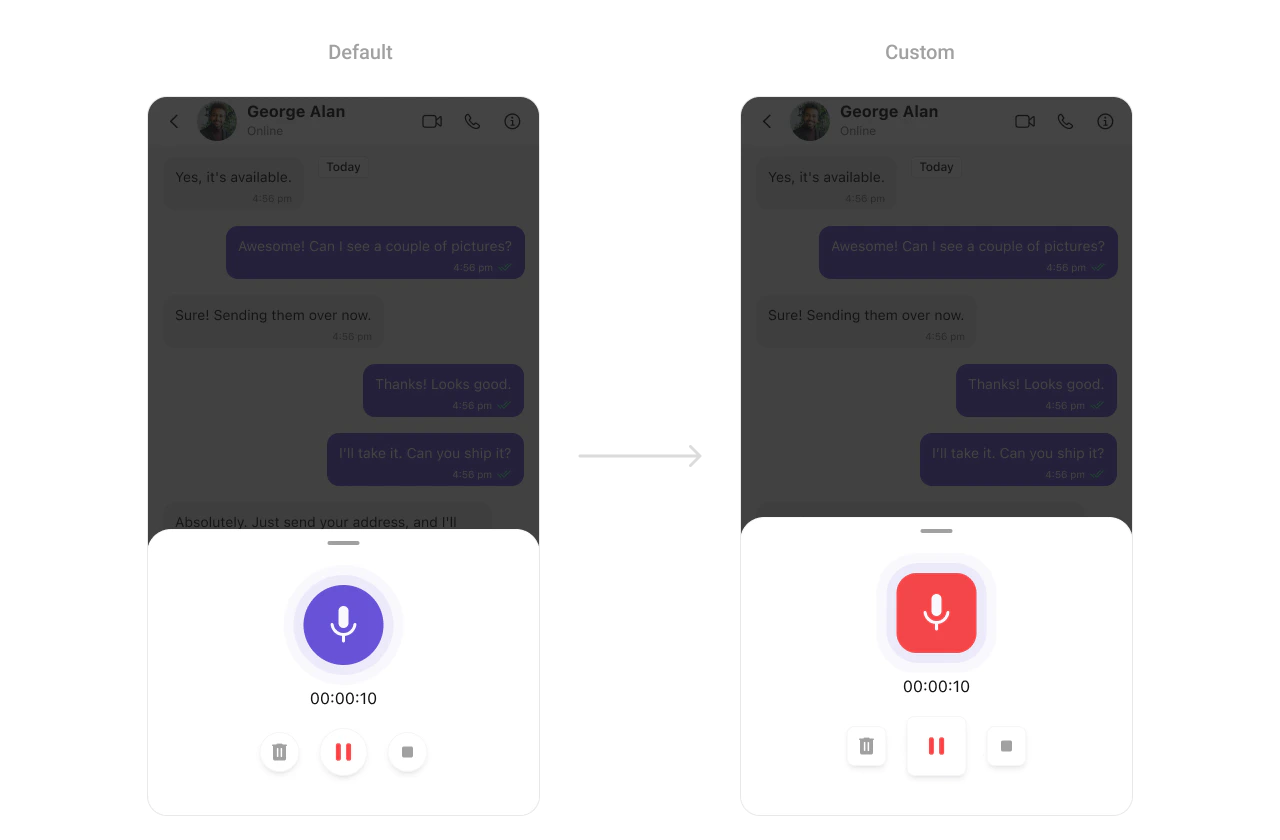 The following properties are exposed by Media Recorder Style:
| **Property** | **Description** | **Code** |
| ---------------------------------- | ------------------------------------------------------- | ------------------------------------------------------------------------------------------------- |
| **backgroundColor** | Sets the background color of the media recorder. | `mediaRecorderStyle.backgroundColor: UIColor = CometChatTheme.backgroundColor01` |
| **borderWidth** | Defines the width of the border for the media recorder. | `mediaRecorderStyle.borderWidth: CGFloat = 1` |
| **borderColor** | Specifies the border color of the media recorder. | `mediaRecorderStyle.borderColor: UIColor = CometChatTheme.borderColorLight` |
| **cornerRadius** | Configures the corner radius of the media recorder. | `mediaRecorderStyle.cornerRadius: CometChatCornerStyle? = nil` |
| **recordingButtonBackgroundColor** | Sets the background color of the recording button. | `mediaRecorderStyle.recordingButtonBackgroundColor: UIColor = CometChatTheme.iconColorHighlight` |
| **recordingButtonCornerRadius** | Configures the corner radius of the recording button. | `mediaRecorderStyle.recordingButtonCornerRadius: CometChatCornerStyle? = nil` |
| **recordingButtonBorderWidth** | Sets the border width of the recording button. | `mediaRecorderStyle.recordingButtonBorderWidth: CGFloat = 0` |
| **recordingButtonBorderColor** | Sets the border color of the recording button. | `mediaRecorderStyle.recordingButtonBorderColor: UIColor = .clear` |
| **recordingButtonImageTintColor** | Specifies the tint color of the recording button image. | `mediaRecorderStyle.recordingButtonImageTintColor: UIColor = CometChatTheme.white` |
| **recordingButtonImage** | The image displayed on the recording button. | `mediaRecorderStyle.recordingButtonImage: UIImage = UIImage(systemName: "mic.fill") ?? UIImage()` |
| **deleteButtonBackgroundColor** | Sets the background color of the delete button. | `mediaRecorderStyle.deleteButtonBackgroundColor: UIColor = CometChatTheme.backgroundColor01` |
| **deleteButtonImageTintColor** | Specifies the tint color of the delete button image. | `mediaRecorderStyle.deleteButtonImageTintColor: UIColor = CometChatTheme.iconColorSecondary` |
| **deleteButtonImage** | The image displayed on the delete button. | `mediaRecorderStyle.deleteButtonImage: UIImage = UIImage(systemName: "trash.fill") ?? UIImage()` |
| **deleteButtonCornerRadius** | Configures the corner radius of the delete button. | `mediaRecorderStyle.deleteButtonCornerRadius: CometChatCornerStyle? = nil` |
| **deleteButtonBorderWidth** | Sets the border width of the delete button. | `mediaRecorderStyle.deleteButtonBorderWidth: CGFloat = 1` |
| **deleteButtonBorderColor** | Specifies the border color of the delete button. | `mediaRecorderStyle.deleteButtonBorderColor: UIColor = CometChatTheme.borderColorLight` |
##### 3. AI Options Style
To customize the media recording styling, you can apply the `AIOptionsStyle` to the `MessageComposer` component. For more details, please refer to [MediaRecorder](/ui-kit/ios/component-styling#media-recorder) styles.
**Global level styling**
```swift theme={null}
CometChatMessageComposer.aiOptionsStyle.backgroundColor = UIColor(hex: "#FFF9F5")
CometChatMessageComposer.aiOptionsStyle.textColor = .black
CometChatMessageComposer.aiOptionsStyle.aiImageTintColor = UIColor(hex: "#F76808")
```
**Instance level styling**
```swift theme={null}
var aIOptionsStyle = AIOptionsStyle()
aIOptionsStyle.backgroundColor = UIColor(hex: "#FFF9F5")
aIOptionsStyle.textColor = .black
aIOptionsStyle.aiImageTintColor = UIColor(hex: "#F76808")
let messageComposer = CometChatMessageComposer()
messageComposer.aiOptionsStyle = aIOptionsStyle
```
The following properties are exposed by Media Recorder Style:
| **Property** | **Description** | **Code** |
| ---------------------------------- | ------------------------------------------------------- | ------------------------------------------------------------------------------------------------- |
| **backgroundColor** | Sets the background color of the media recorder. | `mediaRecorderStyle.backgroundColor: UIColor = CometChatTheme.backgroundColor01` |
| **borderWidth** | Defines the width of the border for the media recorder. | `mediaRecorderStyle.borderWidth: CGFloat = 1` |
| **borderColor** | Specifies the border color of the media recorder. | `mediaRecorderStyle.borderColor: UIColor = CometChatTheme.borderColorLight` |
| **cornerRadius** | Configures the corner radius of the media recorder. | `mediaRecorderStyle.cornerRadius: CometChatCornerStyle? = nil` |
| **recordingButtonBackgroundColor** | Sets the background color of the recording button. | `mediaRecorderStyle.recordingButtonBackgroundColor: UIColor = CometChatTheme.iconColorHighlight` |
| **recordingButtonCornerRadius** | Configures the corner radius of the recording button. | `mediaRecorderStyle.recordingButtonCornerRadius: CometChatCornerStyle? = nil` |
| **recordingButtonBorderWidth** | Sets the border width of the recording button. | `mediaRecorderStyle.recordingButtonBorderWidth: CGFloat = 0` |
| **recordingButtonBorderColor** | Sets the border color of the recording button. | `mediaRecorderStyle.recordingButtonBorderColor: UIColor = .clear` |
| **recordingButtonImageTintColor** | Specifies the tint color of the recording button image. | `mediaRecorderStyle.recordingButtonImageTintColor: UIColor = CometChatTheme.white` |
| **recordingButtonImage** | The image displayed on the recording button. | `mediaRecorderStyle.recordingButtonImage: UIImage = UIImage(systemName: "mic.fill") ?? UIImage()` |
| **deleteButtonBackgroundColor** | Sets the background color of the delete button. | `mediaRecorderStyle.deleteButtonBackgroundColor: UIColor = CometChatTheme.backgroundColor01` |
| **deleteButtonImageTintColor** | Specifies the tint color of the delete button image. | `mediaRecorderStyle.deleteButtonImageTintColor: UIColor = CometChatTheme.iconColorSecondary` |
| **deleteButtonImage** | The image displayed on the delete button. | `mediaRecorderStyle.deleteButtonImage: UIImage = UIImage(systemName: "trash.fill") ?? UIImage()` |
| **deleteButtonCornerRadius** | Configures the corner radius of the delete button. | `mediaRecorderStyle.deleteButtonCornerRadius: CometChatCornerStyle? = nil` |
| **deleteButtonBorderWidth** | Sets the border width of the delete button. | `mediaRecorderStyle.deleteButtonBorderWidth: CGFloat = 1` |
| **deleteButtonBorderColor** | Specifies the border color of the delete button. | `mediaRecorderStyle.deleteButtonBorderColor: UIColor = CometChatTheme.borderColorLight` |
##### 3. AI Options Style
To customize the media recording styling, you can apply the `AIOptionsStyle` to the `MessageComposer` component. For more details, please refer to [MediaRecorder](/ui-kit/ios/component-styling#media-recorder) styles.
**Global level styling**
```swift theme={null}
CometChatMessageComposer.aiOptionsStyle.backgroundColor = UIColor(hex: "#FFF9F5")
CometChatMessageComposer.aiOptionsStyle.textColor = .black
CometChatMessageComposer.aiOptionsStyle.aiImageTintColor = UIColor(hex: "#F76808")
```
**Instance level styling**
```swift theme={null}
var aIOptionsStyle = AIOptionsStyle()
aIOptionsStyle.backgroundColor = UIColor(hex: "#FFF9F5")
aIOptionsStyle.textColor = .black
aIOptionsStyle.aiImageTintColor = UIColor(hex: "#F76808")
let messageComposer = CometChatMessageComposer()
messageComposer.aiOptionsStyle = aIOptionsStyle
```
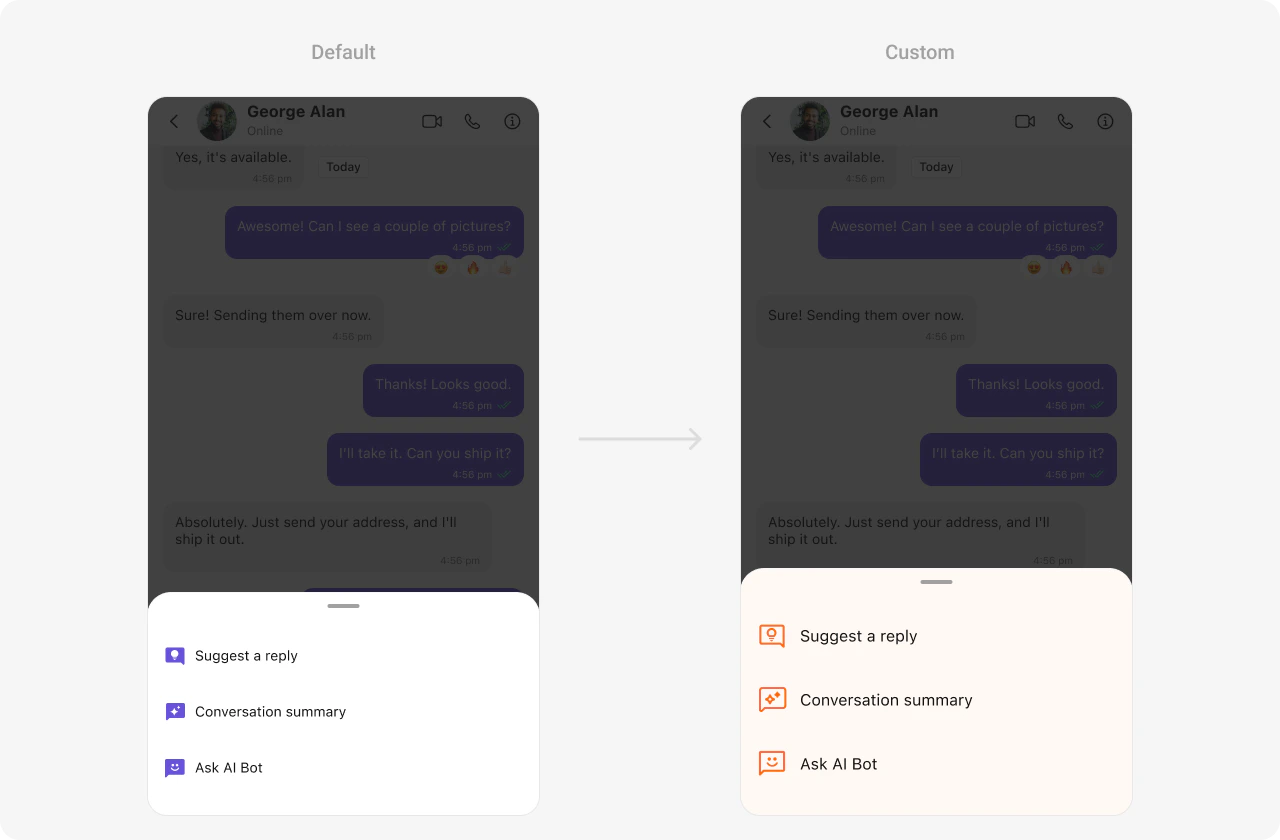 The following properties are exposed by AI Options Style:
| **Property** | **Description** | **Code** |
| ---------------------- | ------------------------------------------------------- | ------------------------------------------------------------------------------ |
| **errorViewTextFont** | Specifies the font used for the text in the error view. | `aIOptionsStyle.errorViewTextFont: UIFont?` |
| **errorViewTextColor** | Sets the color of the text in the error view. | `aIOptionsStyle.errorViewTextColor: UIColor?` |
| **emptyViewTextFont** | Specifies the font used for the text in the empty view. | `aIOptionsStyle.emptyViewTextFont: UIFont?` |
| **emptyViewTextColor** | Sets the color of the text in the empty view. | `aIOptionsStyle.emptyViewTextColor: UIColor?` |
| **aiImageTintColor** | Configures the tint color for AI-related images. | `aIOptionsStyle.aiImageTintColor: UIColor = CometChatTheme.iconColorHighlight` |
| **textColor** | Sets the color of the text. | `aIOptionsStyle.textColor: UIColor = CometChatTheme.textColorPrimary` |
| **textFont** | Specifies the font for the text. | `aIOptionsStyle.textFont: UIFont = CometChatTypography.Heading4.regular` |
| **backgroundColor** | Sets the background color. | `aIOptionsStyle.backgroundColor: UIColor = CometChatTheme.backgroundColor01` |
| **borderWidth** | Sets the width of the border. | `aIOptionsStyle.borderWidth: CGFloat = 0` |
| **borderColor** | Sets the color of the border. | `aIOptionsStyle.borderColor: UIColor = .clear` |
| **cornerRadius** | Configures the corner radius of the view. | `aIOptionsStyle.cornerRadius: CometChatCornerStyle? = nil` |
***
### Functionality
These are a set of small functional customizations that allow you to fine-tune the overall experience of the component. With these, you can set maximum lines text area will show before scrolling in the composer, edit a message, add header view and footer view to the composer, etc.
Below is a list of customizations along with corresponding code snippets message composer offers
| Property | Description | Code |
| --------------------------------- | -------------------------------------------------------- | ------------------------------------------ |
| setInitialComposerText | Sets the initial text in the composer when it loads. | `setInitialComposerText("Hello")` |
| disableTypingEvents | Disables sending typing indicators when the user types. | `disableTypingEvents = true` |
| disableMentions | Disables the mention feature in the composer. | `disableMentions = true` |
| hideImageAttachmentOption | Hides the option to attach images. | `hideImageAttachmentOption = true` |
| hideVideoAttachmentOption | Hides the option to attach videos. | `hideVideoAttachmentOption = true` |
| hideAudioAttachmentOption | Hides the option to attach audio files. | `hideAudioAttachmentOption = true` |
| hideFileAttachmentOption | Hides the option to attach files. | `hideFileAttachmentOption = true` |
| hidePollsOption | Hides the option to create polls. | `hidePollsOption = true` |
| hideCollaborativeDocumentOption | Hides the option for collaborative documents. | `hideCollaborativeDocumentOption = true` |
| hideCollaborativeWhiteboardOption | Hides the option for collaborative whiteboards. | `hideCollaborativeWhiteboardOption = true` |
| hideAttachmentButton | Hides the attachment button in the composer. | `hideAttachmentButton = true` |
| hideVoiceRecordingButton | Hides the voice recording button. | `hideVoiceRecordingButton = true` |
| hideStickersButton | Hides the stickers button. | `hideStickersButton = true` |
| hideSendButton | Hides the send button. | `hideSendButton = true` |
| setUser | Sets the user for direct messaging. | `set(user: User)` |
| setGroup | Sets the group for group messaging. | `set(group: Group)` |
| setParentMessageId | Sets the parent message ID for replying in a thread. | `set(parentMessageId: 12345)` |
| setMaxLine | Sets the maximum number of lines for the composer input. | `set(maxLine: 3)` |
| setCustomSoundForMessages | Sets a custom sound for sending messages. | `set(customSoundForMessages: URL?)` |
| disableSoundForMessages | Disables sound while sending messages. | `disableSoundForMessages = true` |
***
### Advanced
For advanced-level customization, you can set custom views to the component. This lets you tailor each aspect of the component to fit your exact needs and application aesthetics. You can create and define your views, layouts, and UI elements and then incorporate those into the component.
#### AttachmentOptions
By using `set(attachmentOptions:)`, you can set a list of custom `MessageComposerActions` for the MessageComposer Component. This will override the existing list of `CometChatMessageComposerAction`.
```swift theme={null}
let messageComposer = CometChatMessageComposer()
messageComposer.set(attachmentOptions: { user, group, controller in
return [CometChatMessageComposerAction]
})
```
**Demonstration**
The following properties are exposed by AI Options Style:
| **Property** | **Description** | **Code** |
| ---------------------- | ------------------------------------------------------- | ------------------------------------------------------------------------------ |
| **errorViewTextFont** | Specifies the font used for the text in the error view. | `aIOptionsStyle.errorViewTextFont: UIFont?` |
| **errorViewTextColor** | Sets the color of the text in the error view. | `aIOptionsStyle.errorViewTextColor: UIColor?` |
| **emptyViewTextFont** | Specifies the font used for the text in the empty view. | `aIOptionsStyle.emptyViewTextFont: UIFont?` |
| **emptyViewTextColor** | Sets the color of the text in the empty view. | `aIOptionsStyle.emptyViewTextColor: UIColor?` |
| **aiImageTintColor** | Configures the tint color for AI-related images. | `aIOptionsStyle.aiImageTintColor: UIColor = CometChatTheme.iconColorHighlight` |
| **textColor** | Sets the color of the text. | `aIOptionsStyle.textColor: UIColor = CometChatTheme.textColorPrimary` |
| **textFont** | Specifies the font for the text. | `aIOptionsStyle.textFont: UIFont = CometChatTypography.Heading4.regular` |
| **backgroundColor** | Sets the background color. | `aIOptionsStyle.backgroundColor: UIColor = CometChatTheme.backgroundColor01` |
| **borderWidth** | Sets the width of the border. | `aIOptionsStyle.borderWidth: CGFloat = 0` |
| **borderColor** | Sets the color of the border. | `aIOptionsStyle.borderColor: UIColor = .clear` |
| **cornerRadius** | Configures the corner radius of the view. | `aIOptionsStyle.cornerRadius: CometChatCornerStyle? = nil` |
***
### Functionality
These are a set of small functional customizations that allow you to fine-tune the overall experience of the component. With these, you can set maximum lines text area will show before scrolling in the composer, edit a message, add header view and footer view to the composer, etc.
Below is a list of customizations along with corresponding code snippets message composer offers
| Property | Description | Code |
| --------------------------------- | -------------------------------------------------------- | ------------------------------------------ |
| setInitialComposerText | Sets the initial text in the composer when it loads. | `setInitialComposerText("Hello")` |
| disableTypingEvents | Disables sending typing indicators when the user types. | `disableTypingEvents = true` |
| disableMentions | Disables the mention feature in the composer. | `disableMentions = true` |
| hideImageAttachmentOption | Hides the option to attach images. | `hideImageAttachmentOption = true` |
| hideVideoAttachmentOption | Hides the option to attach videos. | `hideVideoAttachmentOption = true` |
| hideAudioAttachmentOption | Hides the option to attach audio files. | `hideAudioAttachmentOption = true` |
| hideFileAttachmentOption | Hides the option to attach files. | `hideFileAttachmentOption = true` |
| hidePollsOption | Hides the option to create polls. | `hidePollsOption = true` |
| hideCollaborativeDocumentOption | Hides the option for collaborative documents. | `hideCollaborativeDocumentOption = true` |
| hideCollaborativeWhiteboardOption | Hides the option for collaborative whiteboards. | `hideCollaborativeWhiteboardOption = true` |
| hideAttachmentButton | Hides the attachment button in the composer. | `hideAttachmentButton = true` |
| hideVoiceRecordingButton | Hides the voice recording button. | `hideVoiceRecordingButton = true` |
| hideStickersButton | Hides the stickers button. | `hideStickersButton = true` |
| hideSendButton | Hides the send button. | `hideSendButton = true` |
| setUser | Sets the user for direct messaging. | `set(user: User)` |
| setGroup | Sets the group for group messaging. | `set(group: Group)` |
| setParentMessageId | Sets the parent message ID for replying in a thread. | `set(parentMessageId: 12345)` |
| setMaxLine | Sets the maximum number of lines for the composer input. | `set(maxLine: 3)` |
| setCustomSoundForMessages | Sets a custom sound for sending messages. | `set(customSoundForMessages: URL?)` |
| disableSoundForMessages | Disables sound while sending messages. | `disableSoundForMessages = true` |
***
### Advanced
For advanced-level customization, you can set custom views to the component. This lets you tailor each aspect of the component to fit your exact needs and application aesthetics. You can create and define your views, layouts, and UI elements and then incorporate those into the component.
#### AttachmentOptions
By using `set(attachmentOptions:)`, you can set a list of custom `MessageComposerActions` for the MessageComposer Component. This will override the existing list of `CometChatMessageComposerAction`.
```swift theme={null}
let messageComposer = CometChatMessageComposer()
messageComposer.set(attachmentOptions: { user, group, controller in
return [CometChatMessageComposerAction]
})
```
**Demonstration**
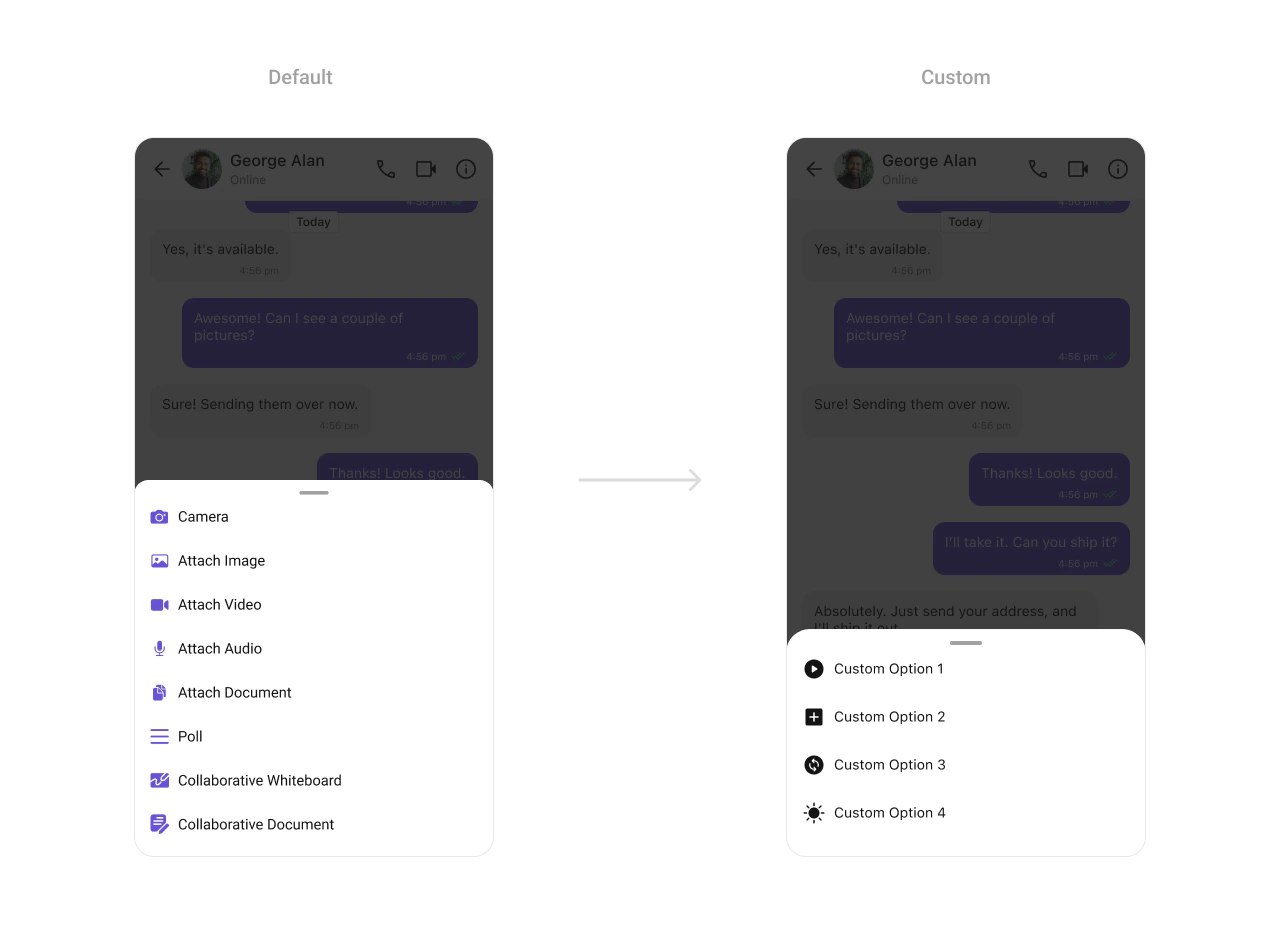 In this example, we are overriding the existing MessageComposerActions List with Capture Photo actions.
```swift theme={null}
let messageComposer = CometChatMessageComposer()
messageComposer.setAttachmentOptions { user, group, controller in
let customComposerAction1 = CometChatMessageComposerAction(id: "customAction1",text: "Custom Option 1",startIcon: UIImage(systemName: "play_circle"),startIconTint: .black,textColor: .black,onActionClick: {print("Custom Action 1 clicked!")})
let customComposerAction2 = CometChatMessageComposerAction(id: "customAction2",text: "Custom Option 2",startIcon: UIImage(systemName: "add_box"),startIconTint: .black,textColor: .black,onActionClick: {print("Custom Action 2 clicked!")})
let customComposerAction3 = CometChatMessageComposerAction(id: "customAction3",text: "Custom Option 3",startIcon: UIImage(systemName: "change_circle"),startIconTint: .black,textColor: .black,onActionClick: {print("Custom Action 3 clicked!")})
let customComposerAction4 = CometChatMessageComposerAction(id: "customAction4",text: "Custom Option 4",startIcon: UIImage(systemName: "sunny"),startIconTint: .black,textColor: .black,onActionClick: {print("Custom Action 4 clicked!")})
return [customComposerAction1 , customComposerAction2, customComposerAction3, customComposerAction4]
}
```
***
#### SendButtonView
By using `set(sendButtonView:)`, you can set a custom send button for the MessageComposer Component.
```swift theme={null}
let messageComposer = CustomSendButton()
messageComposer.set(sendButtonView: { user, group in
let view = CustomSendButton()
return view
})
```
**Demonstration**
In this example, we are overriding the existing MessageComposerActions List with Capture Photo actions.
```swift theme={null}
let messageComposer = CometChatMessageComposer()
messageComposer.setAttachmentOptions { user, group, controller in
let customComposerAction1 = CometChatMessageComposerAction(id: "customAction1",text: "Custom Option 1",startIcon: UIImage(systemName: "play_circle"),startIconTint: .black,textColor: .black,onActionClick: {print("Custom Action 1 clicked!")})
let customComposerAction2 = CometChatMessageComposerAction(id: "customAction2",text: "Custom Option 2",startIcon: UIImage(systemName: "add_box"),startIconTint: .black,textColor: .black,onActionClick: {print("Custom Action 2 clicked!")})
let customComposerAction3 = CometChatMessageComposerAction(id: "customAction3",text: "Custom Option 3",startIcon: UIImage(systemName: "change_circle"),startIconTint: .black,textColor: .black,onActionClick: {print("Custom Action 3 clicked!")})
let customComposerAction4 = CometChatMessageComposerAction(id: "customAction4",text: "Custom Option 4",startIcon: UIImage(systemName: "sunny"),startIconTint: .black,textColor: .black,onActionClick: {print("Custom Action 4 clicked!")})
return [customComposerAction1 , customComposerAction2, customComposerAction3, customComposerAction4]
}
```
***
#### SendButtonView
By using `set(sendButtonView:)`, you can set a custom send button for the MessageComposer Component.
```swift theme={null}
let messageComposer = CustomSendButton()
messageComposer.set(sendButtonView: { user, group in
let view = CustomSendButton()
return view
})
```
**Demonstration**
 ```swift theme={null}
import UIKit
class CustomSendButton: UIView {
private let playButton: UIButton = {
let button = UIButton(type: .system)
let playImage = UIImage(systemName: "play.fill")?.withRenderingMode(.alwaysTemplate)
button.setImage(playImage, for: .normal)
button.tintColor = .purple
button.backgroundColor = .clear
button.addTarget(self, action: #selector(playButtonTapped), for: .touchUpInside)
return button
}()
var onPlayTapped: (() -> Void)?
override init(frame: CGRect) {
super.init(frame: frame)
setupView()
}
required init?(coder: NSCoder) {
fatalError("init(coder:) has not been implemented")
}
private func setupView() {
backgroundColor = UIColor.purple.withAlphaComponent(0.1)
layer.cornerRadius = 12
addSubview(playButton)
playButton.translatesAutoresizingMaskIntoConstraints = false
NSLayoutConstraint.activate([
playButton.centerXAnchor.constraint(equalTo: centerXAnchor),
playButton.centerYAnchor.constraint(equalTo: centerYAnchor),
playButton.widthAnchor.constraint(equalToConstant: 30),
playButton.heightAnchor.constraint(equalToConstant: 30)
])
}
@objc private func playButtonTapped() {
onPlayTapped?()
}
}
```
***
#### HeaderView
By using `set(headerView:)`, you can set a custom header view for the MessageComposer Component.
```swift theme={null}
let messageComposer = CometChatMessageComposer()
messageComposer.set(headerView: { user, group in
let view = CustomHeaderView()
return view
})
```
**Demonstration**
```swift theme={null}
import UIKit
class CustomSendButton: UIView {
private let playButton: UIButton = {
let button = UIButton(type: .system)
let playImage = UIImage(systemName: "play.fill")?.withRenderingMode(.alwaysTemplate)
button.setImage(playImage, for: .normal)
button.tintColor = .purple
button.backgroundColor = .clear
button.addTarget(self, action: #selector(playButtonTapped), for: .touchUpInside)
return button
}()
var onPlayTapped: (() -> Void)?
override init(frame: CGRect) {
super.init(frame: frame)
setupView()
}
required init?(coder: NSCoder) {
fatalError("init(coder:) has not been implemented")
}
private func setupView() {
backgroundColor = UIColor.purple.withAlphaComponent(0.1)
layer.cornerRadius = 12
addSubview(playButton)
playButton.translatesAutoresizingMaskIntoConstraints = false
NSLayoutConstraint.activate([
playButton.centerXAnchor.constraint(equalTo: centerXAnchor),
playButton.centerYAnchor.constraint(equalTo: centerYAnchor),
playButton.widthAnchor.constraint(equalToConstant: 30),
playButton.heightAnchor.constraint(equalToConstant: 30)
])
}
@objc private func playButtonTapped() {
onPlayTapped?()
}
}
```
***
#### HeaderView
By using `set(headerView:)`, you can set a custom header view for the MessageComposer Component.
```swift theme={null}
let messageComposer = CometChatMessageComposer()
messageComposer.set(headerView: { user, group in
let view = CustomHeaderView()
return view
})
```
**Demonstration**
 ```swift theme={null}
import UIKit
class CustomHeaderView: UIView {
private let iconImageView: UIImageView = {
let imageView = UIImageView()
imageView.image = UIImage(systemName: "bell.slash.fill")
imageView.tintColor = .purple
imageView.contentMode = .scaleAspectFit
return imageView
}()
private let messageLabel: UILabel = {
let label = UILabel()
label.text = "User has paused their notifications"
label.textColor = .black
label.font = UIFont.systemFont(ofSize: 14, weight: .medium)
return label
}()
override init(frame: CGRect) {
super.init(frame: frame)
setupView()
}
required init?(coder: NSCoder) {
fatalError("init(coder:) has not been implemented")
}
private func setupView() {
backgroundColor = UIColor.purple.withAlphaComponent(0.1)
layer.cornerRadius = 12
addSubview(iconImageView)
addSubview(messageLabel)
iconImageView.translatesAutoresizingMaskIntoConstraints = false
messageLabel.translatesAutoresizingMaskIntoConstraints = false
NSLayoutConstraint.activate([
iconImageView.leadingAnchor.constraint(equalTo: leadingAnchor, constant: 12),
iconImageView.centerYAnchor.constraint(equalTo: centerYAnchor),
iconImageView.widthAnchor.constraint(equalToConstant: 20),
iconImageView.heightAnchor.constraint(equalToConstant: 20),
messageLabel.leadingAnchor.constraint(equalTo: iconImageView.trailingAnchor, constant: 8),
messageLabel.trailingAnchor.constraint(equalTo: trailingAnchor, constant: -12),
messageLabel.centerYAnchor.constraint(equalTo: centerYAnchor)
])
}
}
```
***
#### SetTextFormatters
Assigns the list of text formatters. If the provided list is not null, it sets the list. Otherwise, it assigns the default text formatters retrieved from the data source. To configure the existing Mentions look and feel check out [CometChatMentionsFormatter](/ui-kit/ios/mentions-formatter-guide)
**Example**
```swift theme={null}
let composerTextStyle = MentionTextStyle()
.set(textBackgroundColor: .white)
.set(textColor: UIColor.black)
.set(textFont: UIFont.systemFont(ofSize: 18, weight: .heavy))
.set(loggedInUserTextColor: UIColor.systemTeal)
.set(loggedInUserTextFont: UIFont.systemFont(ofSize: 18, weight: .bold))
let customMentionFormatter = CometChatMentionsFormatter()
.set(composerTextStyle: composerTextStyle)
let messageComposerConfiguration = MessageComposerConfiguration()
.set(textFormatter: [customMentionFormatter])
let cometChatMessages = CometChatMessages()
.set(user: user)
.set(messageComposerConfiguration: messageComposerConfiguration)
```
***
To ensure that the `MessageComposer` is properly configured, passing the controller is mandatory.
```swift theme={null}
let composerView = CometChatMessageComposer()
composerView.set(controller: UIViewController) // Passing the controller is required
```
***
Ensure to pass and present `cometChatMessages`. If a navigation controller is already in use, utilize the pushViewController function instead of directly presenting the view controller.
***
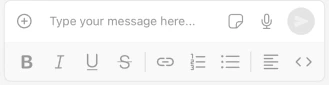
## Compact Message Composer
`CometChatCompactMessageComposer` is a compact message composer component with built-in rich text formatting support. It provides a streamlined, single-line input experience with an expandable text area and a formatting toolbar.
```swift theme={null}
import UIKit
class CustomHeaderView: UIView {
private let iconImageView: UIImageView = {
let imageView = UIImageView()
imageView.image = UIImage(systemName: "bell.slash.fill")
imageView.tintColor = .purple
imageView.contentMode = .scaleAspectFit
return imageView
}()
private let messageLabel: UILabel = {
let label = UILabel()
label.text = "User has paused their notifications"
label.textColor = .black
label.font = UIFont.systemFont(ofSize: 14, weight: .medium)
return label
}()
override init(frame: CGRect) {
super.init(frame: frame)
setupView()
}
required init?(coder: NSCoder) {
fatalError("init(coder:) has not been implemented")
}
private func setupView() {
backgroundColor = UIColor.purple.withAlphaComponent(0.1)
layer.cornerRadius = 12
addSubview(iconImageView)
addSubview(messageLabel)
iconImageView.translatesAutoresizingMaskIntoConstraints = false
messageLabel.translatesAutoresizingMaskIntoConstraints = false
NSLayoutConstraint.activate([
iconImageView.leadingAnchor.constraint(equalTo: leadingAnchor, constant: 12),
iconImageView.centerYAnchor.constraint(equalTo: centerYAnchor),
iconImageView.widthAnchor.constraint(equalToConstant: 20),
iconImageView.heightAnchor.constraint(equalToConstant: 20),
messageLabel.leadingAnchor.constraint(equalTo: iconImageView.trailingAnchor, constant: 8),
messageLabel.trailingAnchor.constraint(equalTo: trailingAnchor, constant: -12),
messageLabel.centerYAnchor.constraint(equalTo: centerYAnchor)
])
}
}
```
***
#### SetTextFormatters
Assigns the list of text formatters. If the provided list is not null, it sets the list. Otherwise, it assigns the default text formatters retrieved from the data source. To configure the existing Mentions look and feel check out [CometChatMentionsFormatter](/ui-kit/ios/mentions-formatter-guide)
**Example**
```swift theme={null}
let composerTextStyle = MentionTextStyle()
.set(textBackgroundColor: .white)
.set(textColor: UIColor.black)
.set(textFont: UIFont.systemFont(ofSize: 18, weight: .heavy))
.set(loggedInUserTextColor: UIColor.systemTeal)
.set(loggedInUserTextFont: UIFont.systemFont(ofSize: 18, weight: .bold))
let customMentionFormatter = CometChatMentionsFormatter()
.set(composerTextStyle: composerTextStyle)
let messageComposerConfiguration = MessageComposerConfiguration()
.set(textFormatter: [customMentionFormatter])
let cometChatMessages = CometChatMessages()
.set(user: user)
.set(messageComposerConfiguration: messageComposerConfiguration)
```
***
To ensure that the `MessageComposer` is properly configured, passing the controller is mandatory.
```swift theme={null}
let composerView = CometChatMessageComposer()
composerView.set(controller: UIViewController) // Passing the controller is required
```
***
Ensure to pass and present `cometChatMessages`. If a navigation controller is already in use, utilize the pushViewController function instead of directly presenting the view controller.
***
## Compact Message Composer
`CometChatCompactMessageComposer` is a compact message composer component with built-in rich text formatting support. It provides a streamlined, single-line input experience with an expandable text area and a formatting toolbar.
 ### Usage
```swift theme={null}
let compactComposer = CometChatCompactMessageComposer()
compactComposer.set(user: user)
compactComposer.set(controller: self)
```
#### Enabling Rich Text Formatting
```swift theme={null}
let compactComposer = CometChatCompactMessageComposer()
compactComposer.showRichTextFormattingOptions = true // Shows the formatting toolbar
compactComposer.enableRichTextFormatting = true // Enables markdown conversion
compactComposer.set(user: user)
compactComposer.set(controller: self)
```
#### Complete Integration Example
```swift theme={null}
import UIKit
import CometChatUIKitSwift
class ChatViewController: UIViewController {
var user: User?
override func viewDidLoad() {
super.viewDidLoad()
setupComposer()
}
private func setupComposer() {
guard let user = user else { return }
// Create and configure the composer
let compactComposer = CometChatCompactMessageComposer()
compactComposer.set(user: user)
compactComposer.set(controller: self)
// Enable rich text formatting
compactComposer.showRichTextFormattingOptions = true
compactComposer.enableRichTextFormatting = true
// Customize appearance
compactComposer.set(placeholder: "Type a message...")
// Add to view hierarchy
compactComposer.translatesAutoresizingMaskIntoConstraints = false
view.addSubview(compactComposer)
NSLayoutConstraint.activate([
compactComposer.leadingAnchor.constraint(equalTo: view.leadingAnchor),
compactComposer.trailingAnchor.constraint(equalTo: view.trailingAnchor),
compactComposer.bottomAnchor.constraint(equalTo: view.safeAreaLayoutGuide.bottomAnchor)
])
}
}
```
***
### CompactMessageComposerStyle
**Global level styling**
```swift theme={null}
CometChatCompactMessageComposer.style.activeSendButtonBackgroundColor = UIColor(hex: "#F76808")
CometChatCompactMessageComposer.style.attachmentImageTint = UIColor(hex: "#F76808")
CometChatCompactMessageComposer.style.voiceRecordingImageTint = UIColor(hex: "#F76808")
```
**Instance level styling**
```swift theme={null}
var customStyle = CompactMessageComposerStyle()
customStyle.activeSendButtonBackgroundColor = UIColor(hex: "#F76808")
customStyle.attachmentImageTint = UIColor(hex: "#F76808")
let compactComposer = CometChatCompactMessageComposer()
compactComposer.style = customStyle
```
**Complete Styling Example**
```swift theme={null}
// Create custom style
var customStyle = CompactMessageComposerStyle()
customStyle.backgroundColor = UIColor(hex: "#F5F5F5")
customStyle.composeBoxBackgroundColor = .white
customStyle.composeBoxBorderColor = UIColor(hex: "#E0E0E0")
customStyle.textFieldColor = .black
customStyle.placeholderColor = UIColor(hex: "#999999")
customStyle.activeSendButtonBackgroundColor = UIColor(hex: "#6851D6")
customStyle.inactiveSendButtonBackgroundColor = UIColor(hex: "#CCCCCC")
customStyle.attachmentImageTint = UIColor(hex: "#6851D6")
customStyle.voiceRecordingImageTint = UIColor(hex: "#6851D6")
// Create custom toolbar style for rich text formatting
var toolbarStyle = RichTextToolbarStyle()
toolbarStyle.backgroundColor = UIColor(hex: "#FAFAFA")
toolbarStyle.iconTintColor = UIColor(hex: "#666666")
toolbarStyle.activeIconTintColor = UIColor(hex: "#6851D6")
toolbarStyle.activeButtonBackgroundColor = UIColor(hex: "#EDE9FC")
customStyle.richTextToolbarStyle = toolbarStyle
// Apply to composer
let compactComposer = CometChatCompactMessageComposer()
compactComposer.style = customStyle
compactComposer.showRichTextFormattingOptions = true
compactComposer.enableRichTextFormatting = true
compactComposer.set(user: user)
compactComposer.set(controller: self)
```
The following properties are exposed by CompactMessageComposerStyle:
| Property | Description | Code |
| --------------------------------- | ----------------------------------------------- | -------------------------------------------------------------------------- |
| backgroundColor | Background color of the composer container. | `style.backgroundColor = CometChatTheme.backgroundColor03` |
| composeBoxBackgroundColor | Background color for the compose box. | `style.composeBoxBackgroundColor = CometChatTheme.backgroundColor01` |
| composeBoxBorderColor | Border color for the compose box. | `style.composeBoxBorderColor = CometChatTheme.borderColorDefault` |
| textFieldFont | Font for the input text field. | `style.textFieldFont = CometChatTypography.Body.regular` |
| textFieldColor | Text color for the input field. | `style.textFieldColor = CometChatTheme.textColorPrimary` |
| placeholderColor | Color for the placeholder text. | `style.placeholderColor = CometChatTheme.textColorTertiary` |
| sendButtonImage | Icon for the send button. | `style.sendButtonImage = UIImage(named: "custom-send")` |
| sendButtonImageTint | Tint color for the send button image. | `style.sendButtonImageTint = CometChatTheme.white` |
| activeSendButtonBackgroundColor | Background color for send button when active. | `style.activeSendButtonBackgroundColor = CometChatTheme.primaryColor` |
| inactiveSendButtonBackgroundColor | Background color for send button when inactive. | `style.inactiveSendButtonBackgroundColor = CometChatTheme.neutralColor300` |
| attachmentImage | Icon for the attachment button. | `style.attachmentImage = UIImage(systemName: "plus.circle")` |
| attachmentImageTint | Tint color for the attachment image. | `style.attachmentImageTint = CometChatTheme.iconColorSecondary` |
| voiceRecordingImage | Icon for the voice recording button. | `style.voiceRecordingImage = UIImage(systemName: "mic")` |
| voiceRecordingImageTint | Tint color for the voice recording image. | `style.voiceRecordingImageTint = CometChatTheme.iconColorSecondary` |
| stickersImage | Icon for the stickers button. | `style.stickersImage = UIImage(named: "sticker-image")` |
| stickersImageTint | Tint color for the stickers image. | `style.stickersImageTint = CometChatTheme.iconColorSecondary` |
| richTextToolbarStyle | Style configuration for the rich text toolbar. | `style.richTextToolbarStyle = RichTextToolbarStyle()` |
***
### Functionality
These properties allow you to customize the behavior of the CometChatCompactMessageComposer.
| Property | Description | Code |
| ----------------------------- | ----------------------------------------------------- | --------------------------------------- |
| set(user:) | Sets the user for direct messaging. | `set(user: User)` |
| set(group:) | Sets the group for group messaging. | `set(group: Group)` |
| set(parentMessageId:) | Sets the parent message ID for thread replies. | `set(parentMessageId: 12345)` |
| set(placeholder:) | Sets the placeholder text. | `set(placeholder: "Type a message...")` |
| disable(soundForMessages:) | Disables sound while sending messages. | `disable(soundForMessages: true)` |
| disable(typingEvents:) | Disables sending typing indicators. | `disable(typingEvents: true)` |
| disable(mentions:) | Disables the mention feature. | `disable(mentions: true)` |
| hideAttachmentButton | Hides the attachment button. | `hideAttachmentButton = true` |
| hideVoiceRecordingButton | Hides the voice recording button. | `hideVoiceRecordingButton = true` |
| hideStickersButton | Hides the stickers button. | `hideStickersButton = true` |
| hideSendButton | Hides the send button. | `hideSendButton = true` |
| showRichTextFormattingOptions | Shows/hides the rich text formatting toolbar. | `showRichTextFormattingOptions = true` |
| enableRichTextFormatting | Enables rich text formatting and markdown conversion. | `enableRichTextFormatting = true` |
**Example**
```swift theme={null}
let compactComposer = CometChatCompactMessageComposer()
// Set user or group
compactComposer.set(user: user)
// OR for group messaging
// compactComposer.set(group: group)
// For thread replies
compactComposer.set(parentMessageId: 12345)
// Customize placeholder
compactComposer.set(placeholder: "Type your message...")
// Disable features
compactComposer.disable(soundForMessages: true)
compactComposer.disable(typingEvents: true)
compactComposer.disable(mentions: true)
// Hide UI elements
compactComposer.hideAttachmentButton = true
compactComposer.hideVoiceRecordingButton = true
compactComposer.hideStickersButton = true
// Enable rich text formatting
compactComposer.showRichTextFormattingOptions = true
compactComposer.enableRichTextFormatting = true
// Required: Set the controller
compactComposer.set(controller: self)
```
***
## Rich Text Formatting
The Rich Text Formatting feature allows users to format messages with various text styles. When enabled, a formatting toolbar appears below the text input.
### Supported Format Types
| Format | Description | Markdown Syntax |
| ------------- | ----------------------- | --------------- |
| Bold | Makes text bold | `**text**` |
| Italic | Makes text italic | `*text*` |
| Underline | Underlines text | `text` |
| Strikethrough | Strikes through text | `~~text~~` |
| Link | Creates a hyperlink | `[text](url)` |
| Numbered List | Creates a numbered list | `1. item` |
| Bullet List | Creates a bullet list | `- item` |
| Blockquote | Creates a blockquote | `> text` |
| Inline Code | Formats as inline code | `` `code` `` |
| Code Block | Creates a code block | ` ```code``` ` |
***
### RichTextToolbarStyle
**Global level styling**
```swift theme={null}
CometChatCompactMessageComposer.style.richTextToolbarStyle.backgroundColor = UIColor(hex: "#F5F5F5")
CometChatCompactMessageComposer.style.richTextToolbarStyle.iconTintColor = UIColor(hex: "#666666")
CometChatCompactMessageComposer.style.richTextToolbarStyle.activeIconTintColor = UIColor(hex: "#F76808")
CometChatCompactMessageComposer.style.richTextToolbarStyle.activeButtonBackgroundColor = UIColor(hex: "#FFF0E6")
```
The following properties are exposed by RichTextToolbarStyle:
| Property | Description | Code |
| --------------------------- | -------------------------------------- | ----------------------------------------------------------------------------------- |
| backgroundColor | Background color of the toolbar. | `toolbarStyle.backgroundColor = CometChatTheme.backgroundColor02` |
| borderColor | Border color of the toolbar. | `toolbarStyle.borderColor = CometChatTheme.borderColorLight` |
| buttonSize | Size of format buttons. | `toolbarStyle.buttonSize = 30` |
| buttonSpacing | Spacing between format buttons. | `toolbarStyle.buttonSpacing = CometChatSpacing.Spacing.s2` |
| iconTintColor | Tint color for inactive format icons. | `toolbarStyle.iconTintColor = CometChatTheme.iconColorSecondary` |
| activeIconTintColor | Tint color for active format icons. | `toolbarStyle.activeIconTintColor = CometChatTheme.primaryColor` |
| buttonBackgroundColor | Background color for inactive buttons. | `toolbarStyle.buttonBackgroundColor = .clear` |
| activeButtonBackgroundColor | Background color for active buttons. | `toolbarStyle.activeButtonBackgroundColor = CometChatTheme.extendedPrimaryColor100` |
### Usage
```swift theme={null}
let compactComposer = CometChatCompactMessageComposer()
compactComposer.set(user: user)
compactComposer.set(controller: self)
```
#### Enabling Rich Text Formatting
```swift theme={null}
let compactComposer = CometChatCompactMessageComposer()
compactComposer.showRichTextFormattingOptions = true // Shows the formatting toolbar
compactComposer.enableRichTextFormatting = true // Enables markdown conversion
compactComposer.set(user: user)
compactComposer.set(controller: self)
```
#### Complete Integration Example
```swift theme={null}
import UIKit
import CometChatUIKitSwift
class ChatViewController: UIViewController {
var user: User?
override func viewDidLoad() {
super.viewDidLoad()
setupComposer()
}
private func setupComposer() {
guard let user = user else { return }
// Create and configure the composer
let compactComposer = CometChatCompactMessageComposer()
compactComposer.set(user: user)
compactComposer.set(controller: self)
// Enable rich text formatting
compactComposer.showRichTextFormattingOptions = true
compactComposer.enableRichTextFormatting = true
// Customize appearance
compactComposer.set(placeholder: "Type a message...")
// Add to view hierarchy
compactComposer.translatesAutoresizingMaskIntoConstraints = false
view.addSubview(compactComposer)
NSLayoutConstraint.activate([
compactComposer.leadingAnchor.constraint(equalTo: view.leadingAnchor),
compactComposer.trailingAnchor.constraint(equalTo: view.trailingAnchor),
compactComposer.bottomAnchor.constraint(equalTo: view.safeAreaLayoutGuide.bottomAnchor)
])
}
}
```
***
### CompactMessageComposerStyle
**Global level styling**
```swift theme={null}
CometChatCompactMessageComposer.style.activeSendButtonBackgroundColor = UIColor(hex: "#F76808")
CometChatCompactMessageComposer.style.attachmentImageTint = UIColor(hex: "#F76808")
CometChatCompactMessageComposer.style.voiceRecordingImageTint = UIColor(hex: "#F76808")
```
**Instance level styling**
```swift theme={null}
var customStyle = CompactMessageComposerStyle()
customStyle.activeSendButtonBackgroundColor = UIColor(hex: "#F76808")
customStyle.attachmentImageTint = UIColor(hex: "#F76808")
let compactComposer = CometChatCompactMessageComposer()
compactComposer.style = customStyle
```
**Complete Styling Example**
```swift theme={null}
// Create custom style
var customStyle = CompactMessageComposerStyle()
customStyle.backgroundColor = UIColor(hex: "#F5F5F5")
customStyle.composeBoxBackgroundColor = .white
customStyle.composeBoxBorderColor = UIColor(hex: "#E0E0E0")
customStyle.textFieldColor = .black
customStyle.placeholderColor = UIColor(hex: "#999999")
customStyle.activeSendButtonBackgroundColor = UIColor(hex: "#6851D6")
customStyle.inactiveSendButtonBackgroundColor = UIColor(hex: "#CCCCCC")
customStyle.attachmentImageTint = UIColor(hex: "#6851D6")
customStyle.voiceRecordingImageTint = UIColor(hex: "#6851D6")
// Create custom toolbar style for rich text formatting
var toolbarStyle = RichTextToolbarStyle()
toolbarStyle.backgroundColor = UIColor(hex: "#FAFAFA")
toolbarStyle.iconTintColor = UIColor(hex: "#666666")
toolbarStyle.activeIconTintColor = UIColor(hex: "#6851D6")
toolbarStyle.activeButtonBackgroundColor = UIColor(hex: "#EDE9FC")
customStyle.richTextToolbarStyle = toolbarStyle
// Apply to composer
let compactComposer = CometChatCompactMessageComposer()
compactComposer.style = customStyle
compactComposer.showRichTextFormattingOptions = true
compactComposer.enableRichTextFormatting = true
compactComposer.set(user: user)
compactComposer.set(controller: self)
```
The following properties are exposed by CompactMessageComposerStyle:
| Property | Description | Code |
| --------------------------------- | ----------------------------------------------- | -------------------------------------------------------------------------- |
| backgroundColor | Background color of the composer container. | `style.backgroundColor = CometChatTheme.backgroundColor03` |
| composeBoxBackgroundColor | Background color for the compose box. | `style.composeBoxBackgroundColor = CometChatTheme.backgroundColor01` |
| composeBoxBorderColor | Border color for the compose box. | `style.composeBoxBorderColor = CometChatTheme.borderColorDefault` |
| textFieldFont | Font for the input text field. | `style.textFieldFont = CometChatTypography.Body.regular` |
| textFieldColor | Text color for the input field. | `style.textFieldColor = CometChatTheme.textColorPrimary` |
| placeholderColor | Color for the placeholder text. | `style.placeholderColor = CometChatTheme.textColorTertiary` |
| sendButtonImage | Icon for the send button. | `style.sendButtonImage = UIImage(named: "custom-send")` |
| sendButtonImageTint | Tint color for the send button image. | `style.sendButtonImageTint = CometChatTheme.white` |
| activeSendButtonBackgroundColor | Background color for send button when active. | `style.activeSendButtonBackgroundColor = CometChatTheme.primaryColor` |
| inactiveSendButtonBackgroundColor | Background color for send button when inactive. | `style.inactiveSendButtonBackgroundColor = CometChatTheme.neutralColor300` |
| attachmentImage | Icon for the attachment button. | `style.attachmentImage = UIImage(systemName: "plus.circle")` |
| attachmentImageTint | Tint color for the attachment image. | `style.attachmentImageTint = CometChatTheme.iconColorSecondary` |
| voiceRecordingImage | Icon for the voice recording button. | `style.voiceRecordingImage = UIImage(systemName: "mic")` |
| voiceRecordingImageTint | Tint color for the voice recording image. | `style.voiceRecordingImageTint = CometChatTheme.iconColorSecondary` |
| stickersImage | Icon for the stickers button. | `style.stickersImage = UIImage(named: "sticker-image")` |
| stickersImageTint | Tint color for the stickers image. | `style.stickersImageTint = CometChatTheme.iconColorSecondary` |
| richTextToolbarStyle | Style configuration for the rich text toolbar. | `style.richTextToolbarStyle = RichTextToolbarStyle()` |
***
### Functionality
These properties allow you to customize the behavior of the CometChatCompactMessageComposer.
| Property | Description | Code |
| ----------------------------- | ----------------------------------------------------- | --------------------------------------- |
| set(user:) | Sets the user for direct messaging. | `set(user: User)` |
| set(group:) | Sets the group for group messaging. | `set(group: Group)` |
| set(parentMessageId:) | Sets the parent message ID for thread replies. | `set(parentMessageId: 12345)` |
| set(placeholder:) | Sets the placeholder text. | `set(placeholder: "Type a message...")` |
| disable(soundForMessages:) | Disables sound while sending messages. | `disable(soundForMessages: true)` |
| disable(typingEvents:) | Disables sending typing indicators. | `disable(typingEvents: true)` |
| disable(mentions:) | Disables the mention feature. | `disable(mentions: true)` |
| hideAttachmentButton | Hides the attachment button. | `hideAttachmentButton = true` |
| hideVoiceRecordingButton | Hides the voice recording button. | `hideVoiceRecordingButton = true` |
| hideStickersButton | Hides the stickers button. | `hideStickersButton = true` |
| hideSendButton | Hides the send button. | `hideSendButton = true` |
| showRichTextFormattingOptions | Shows/hides the rich text formatting toolbar. | `showRichTextFormattingOptions = true` |
| enableRichTextFormatting | Enables rich text formatting and markdown conversion. | `enableRichTextFormatting = true` |
**Example**
```swift theme={null}
let compactComposer = CometChatCompactMessageComposer()
// Set user or group
compactComposer.set(user: user)
// OR for group messaging
// compactComposer.set(group: group)
// For thread replies
compactComposer.set(parentMessageId: 12345)
// Customize placeholder
compactComposer.set(placeholder: "Type your message...")
// Disable features
compactComposer.disable(soundForMessages: true)
compactComposer.disable(typingEvents: true)
compactComposer.disable(mentions: true)
// Hide UI elements
compactComposer.hideAttachmentButton = true
compactComposer.hideVoiceRecordingButton = true
compactComposer.hideStickersButton = true
// Enable rich text formatting
compactComposer.showRichTextFormattingOptions = true
compactComposer.enableRichTextFormatting = true
// Required: Set the controller
compactComposer.set(controller: self)
```
***
## Rich Text Formatting
The Rich Text Formatting feature allows users to format messages with various text styles. When enabled, a formatting toolbar appears below the text input.
### Supported Format Types
| Format | Description | Markdown Syntax |
| ------------- | ----------------------- | --------------- |
| Bold | Makes text bold | `**text**` |
| Italic | Makes text italic | `*text*` |
| Underline | Underlines text | `text` |
| Strikethrough | Strikes through text | `~~text~~` |
| Link | Creates a hyperlink | `[text](url)` |
| Numbered List | Creates a numbered list | `1. item` |
| Bullet List | Creates a bullet list | `- item` |
| Blockquote | Creates a blockquote | `> text` |
| Inline Code | Formats as inline code | `` `code` `` |
| Code Block | Creates a code block | ` ```code``` ` |
***
### RichTextToolbarStyle
**Global level styling**
```swift theme={null}
CometChatCompactMessageComposer.style.richTextToolbarStyle.backgroundColor = UIColor(hex: "#F5F5F5")
CometChatCompactMessageComposer.style.richTextToolbarStyle.iconTintColor = UIColor(hex: "#666666")
CometChatCompactMessageComposer.style.richTextToolbarStyle.activeIconTintColor = UIColor(hex: "#F76808")
CometChatCompactMessageComposer.style.richTextToolbarStyle.activeButtonBackgroundColor = UIColor(hex: "#FFF0E6")
```
The following properties are exposed by RichTextToolbarStyle:
| Property | Description | Code |
| --------------------------- | -------------------------------------- | ----------------------------------------------------------------------------------- |
| backgroundColor | Background color of the toolbar. | `toolbarStyle.backgroundColor = CometChatTheme.backgroundColor02` |
| borderColor | Border color of the toolbar. | `toolbarStyle.borderColor = CometChatTheme.borderColorLight` |
| buttonSize | Size of format buttons. | `toolbarStyle.buttonSize = 30` |
| buttonSpacing | Spacing between format buttons. | `toolbarStyle.buttonSpacing = CometChatSpacing.Spacing.s2` |
| iconTintColor | Tint color for inactive format icons. | `toolbarStyle.iconTintColor = CometChatTheme.iconColorSecondary` |
| activeIconTintColor | Tint color for active format icons. | `toolbarStyle.activeIconTintColor = CometChatTheme.primaryColor` |
| buttonBackgroundColor | Background color for inactive buttons. | `toolbarStyle.buttonBackgroundColor = .clear` |
| activeButtonBackgroundColor | Background color for active buttons. | `toolbarStyle.activeButtonBackgroundColor = CometChatTheme.extendedPrimaryColor100` |